In this new era of Call of Duty, you need more than your usual senses of sight and touch, as footsteps are more important than ever before. Unfortunately for SMG players, this year is about stealth, silence, and precision, as any form of movement makes you sound like an elephant. So, it’s pivotal that you get used to using your ears, and with that, you’ll need the best MW2 audio settings.
There’s much more to the best Modern Warfare 2 audio settings than simply cranking up your headset or TV volume to the max, much is the way that gaming has moved on since last time we visited MW2.
So, by using the in-game settings, you’ll find many options to do a bit of jiggery-pokery and here you’ll find a nice winning recipe to be able to hear oncoming footsteps before your opponent hears you, or before a teammate hears them first and snatches your kill.
What Are The Best MW2 Audio Settings?
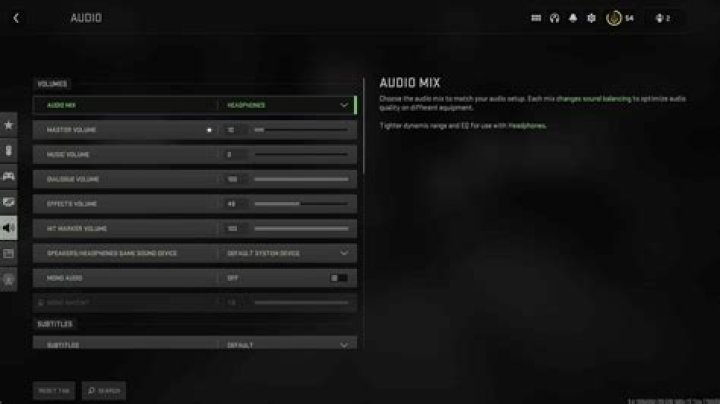
Starting things off, you need to have Headphone Bass Boost. This is quite imperative to your performance, and while other settings can be adjusted, none will work well for footsteps if you’ve not got the bass boost on; it can be tempting to go for the Home Theatre setting, which might be well and good for the immersive campaign, but not for multiplayer.
Then, it’s about levels for your best MW2 audio settings. You want to be hearing the effects and footsteps over the dialogue and command centre voices, and you definitely want to crank down the music.
- Audio Mix: Headphone Bass Boost
- Master Volume: 100
- Music Volume: 0-30
- Dialogue Volume: 50
- Effects Volume: 100
- Hit Marker Volume: 90
- Mono Audio: On
- Mono Amount 1.0
- Subtitles: Default
- Subtitles Size: Default
- Voice Chat Volume: 100
- Juggernaut Music: On
- Hit Marker Sound Effects: Classic
- Reduce Tinnitus Sound: Off
These best MW2 audio settings will improve your gameplay massively, allowing you to hear your enemies before seeing them. Apologies in advance if you get called a cheater for pre-aiming your incoming elephants.
